 ADHDTasker
See it in action
adhdtasker_event fires the announce automation — the TV calls out the finished chore and the room lights turn blue.
Native integration recommended
Install the ADHDTasker Home Assistant integration — a real custom component, no YAML wiring. One step: paste your API key (web app → Manage → Inbound API).
Install (HACS): HACS → ⋮ → Custom repositories → add github.com/bearkiter-alt/adhdtasker-hass (category Integration) → install → restart HA → Settings → Devices & Services → Add Integration → ADHDTasker → paste your API key.
Get the integration → Example dashboard

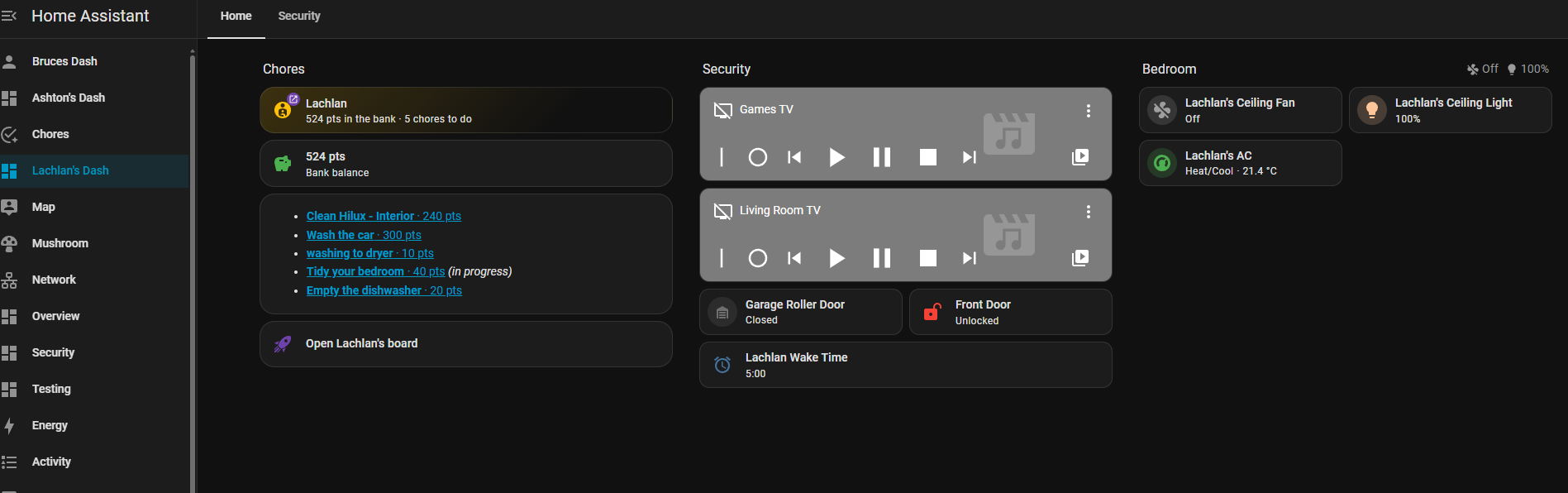
?kid= deep link to land straight on their view in the app.
Want a per‑kid dashboard like that one? Drop this card on a per‑person view — it shows the child's bank balance, just their open chores (each a tap‑through link, in‑progress first), and an Open board button that deep‑links to their filtered board via ?kid=. Swap FAMILY for your family slug and alex/Alex for the child (exact ids in Developer Tools → States):
type: grid
cards:
  - type: heading
    heading: Alex's chores
    icon: mdi:account-child-circle
  - type: entity
    entity: sensor.FAMILY_adhdtasker_alex_bank   # spendable balance ("bank"); swap FAMILY + alex; ids: Developer Tools -> States
    name: Bank balance
    icon: mdi:piggy-bank
  - type: markdown                            # only Alex's open chores, in-progress first then by points
    content: |
      {% set me = 'Alex' %}{% set ts = state_attr('sensor.FAMILY_adhdtasker_open_tasks', 'tasks') or [] %}{% set mine = ts | selectattr('assignee','equalto', me) | list %}{% set ip = mine | selectattr('status','equalto','IN_PROGRESS') | sort(attribute='points', reverse=true) | list %}{% set rest = mine | rejectattr('status','equalto','IN_PROGRESS') | sort(attribute='points', reverse=true) | list %}{% set ordered = ip + rest %}{% if ordered %}
      {% for t in ordered %}- **[{{ t.title }}](https://app.adhdtasker.com/?task={{ t.id }})**{{ ' · ' ~ t.points ~ ' pts' if t.points }}{{ ' · ▶ in progress' if t.status == 'IN_PROGRESS' }}
      {% endfor %}{% else %}_Nothing on {{ me }}'s list!_ 🎉{% endif %}
  - type: button
    name: Open Alex's board                   # ?kid= opens the app filtered to this child (view-only)
    icon: mdi:rocket-launch-outline
    tap_action:
      action: url
      url_path: https://app.adhdtasker.com/?kid=alex
What you get
Entity IDs include your family slug — e.g. for the Muir family the board is todo.muir_adhdtasker_board. Below, swap <family> for your slug; the exact ids are in Developer Tools → States.
- To‑do board
todo.<family>_adhdtasker_board— open tasks as a native To‑do list: type to add, tick to complete (awards points), rename, delete. - Sensors —
sensor.<family>_adhdtasker_open_tasks(state = open count; attributescounts, fulltasks[each with itsassigneename +assigneeProfileId],leaderboard),…_pending_approval,…_last_event(last event type; attrs = full payload), and per‑profilesensor.<family>_adhdtasker_<kid>_points(lifetime) +…_<kid>_bank(balance). - Button
button.<family>_adhdtasker_refresh. - Services —
adhdtasker.add_task,add_interrupt,claim_task,complete_task,approve_task,ping(each takes an optionalconfig_entry_id). - Event
adhdtasker_eventfires on the HA bus for every chore event — it drives the announce blueprint below. - Task links — every task has a URL:
app.adhdtasker.com/?task=<id>jumps straight to that chore on the web app's board (scrolls to it and highlights it), and?tab=approvalsopens the approval queue. The example dashboard's tap‑through board lists every chore as a link with its checkable steps shown as ☐/☑ beneath — glance at the wall tablet, see exactly what's left, tap to open.
Real‑time push (optional)
The integration refreshes the board every minute. For instant updates it registers one webhook and shows its URL in a HA notification on setup — paste that into the web app → Manage → Home Assistant (or enable a Nabu Casa cloudhook for it). Set a shared secret in the integration's options and the same in the app so spoofed posts are ignored. Every push also fires adhdtasker_event.
📣 Announcements & lights use the per‑profile blueprint below (it reacts to adhdtasker_event). Default your TTS to Home Assistant Cloud or any working engine — avoid Google Gemini TTS, which can fail with quota errors.
Events out (ADHDTasker → HA)
ADHDTasker POSTs a small JSON payload to a Home Assistant webhook whenever something happens:
| Event | When |
|---|---|
task.added / task.proposed / interrupt.added | A task or note is created |
task.claimed | Someone picks it up |
task.submitted | Marked done, awaiting approval |
task.completed | Approved and points awarded |
task.due | A reminder time passes |
reward.requested | A child asks to redeem a reward |
ping / test | A ping, or the in‑app "Send test" |
Payload:
{
  "event": "task.completed",
  "secret": "your shared secret",
  "family": "Smith",
  "task":    { "id": "...", "title": "Pick up the dog poo", "points": 50, "type": "DAILY", "status": "DONE" },
  "profile": { "name": "Alex" },
  "reward":  { "title": "30 min screen time", "cost": 50 }
}
Announcements & lights — the blueprint
A dedicated per‑profile blueprint announces chore events to your speakers and optionally flashes a light — one instance per person (Lachlan, Ashton, …). It triggers on the integration's adhdtasker_event, so install the integration first.
- One‑click import — or Settings → Automations & Scenes → Blueprints → Import Blueprint and paste
github.com/bearkiter-alt/adhdtasker-blueprints/blob/main/announce.yaml. (Blueprints import natively — they don't go through HACS.) - Create an automation from ADHDTasker – Per‑profile Announce & Lights.
- Set the profile name (must match exactly), pick events (due / completed / reward), speakers, a TTS engine (default Home Assistant Cloud), and optional light(s) + flash colour.
- Set quiet time per person (default 20:30–07:00) — no announcements or light flashes while they're asleep; the board and dashboards keep updating silently. (v1.1.0+)
- Repeat once per person.
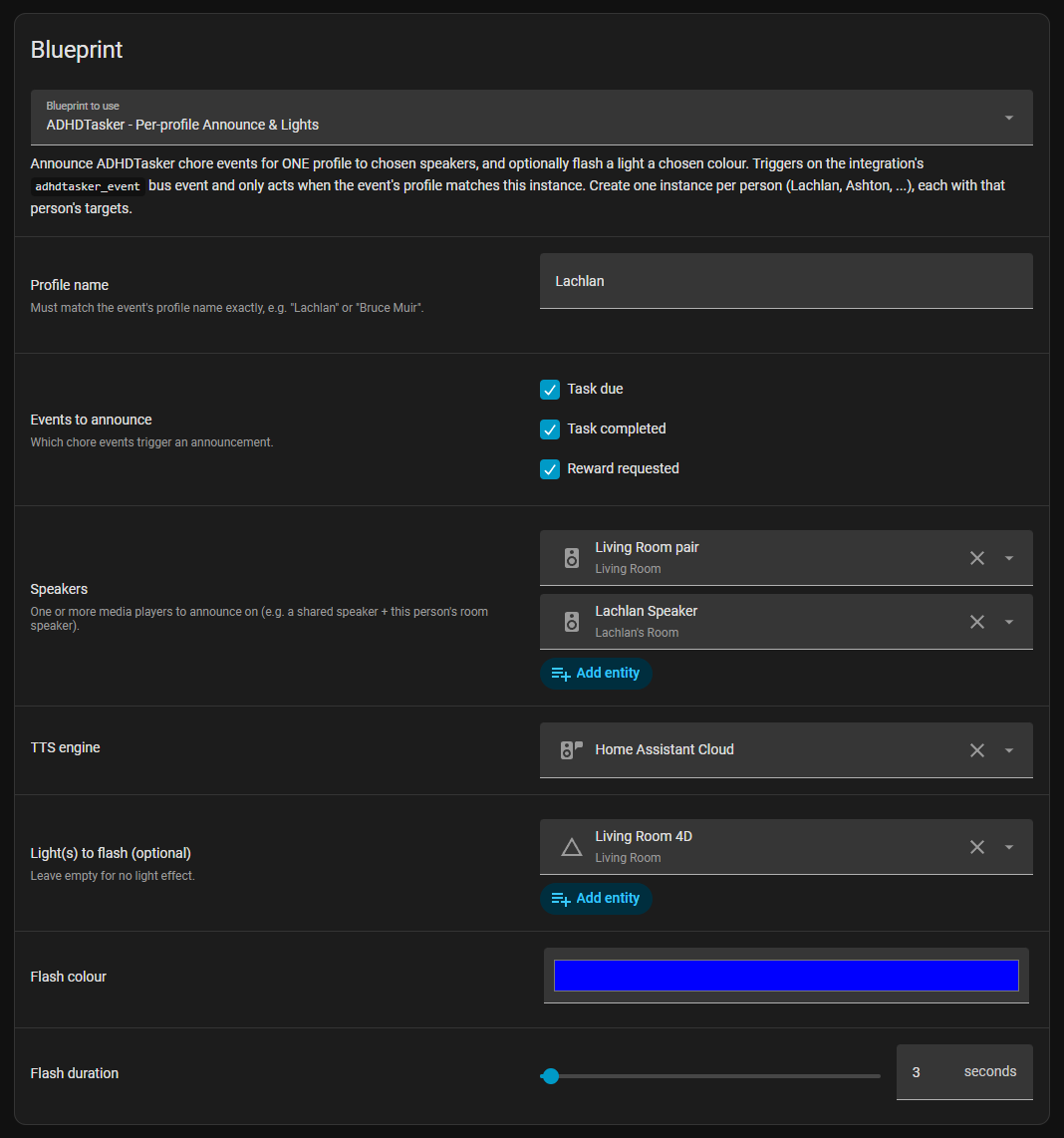
Imported the blueprint before 11 June? Update to v1.0.1 in HACS (and re‑save your automations) — it fixes the light flash never triggering.
Appliance Watcher — chores that create themselves
The dishwasher finishes → "Empty the dishwasher" appears on the board, worth points.
This is a pattern, not another component: a smart plug with power monitoring spots when the dishwasher / washing machine / dryer finishes its cycle, and Home Assistant calls the integration's adhdtasker.add_task service to drop a one‑off chore on the family board. Nobody has to notice the machine finished, nobody has to nag — the work shows up where the kids already look, priced in points, first‑come‑first‑claimed.
You need: Home Assistant, the ADHDTasker integration (above) already configured, and a smart plug with power monitoring on each appliance — any plug that exposes a watts sensor works.
- Import the cycle‑detection blueprint. One‑click import, or paste the gist URL into Settings → Automations & Scenes → Blueprints → Import Blueprint.
- Create one automation per appliance. The essentials:
- Power Sensor — your plug's watts sensor (e.g.
sensor.dishwasher_power). - Start / End Power Setpoint — watts that mean "running" / "finished" (typical: start 10–30 W, end 5–30 W; check your appliance's idle draw).
- End — Power Time Delay — minutes the power must stay low to count as finished (2–3 min avoids false ends on cycle pauses).
- Running — Dead Zone — bridges mid‑cycle power dips (washing machines soak and pause a lot).
- Power Sensor — your plug's watts sensor (e.g.
- Add the chore action. In the blueprint's Use The Custom Action Options, tick "Enable Custom Actions — End" ⚠️ (the actions are silently skipped without this — the single most common mistake), then under Custom Actions — End add:
Points are computed by ADHDTasker as onerousness × minutes × your family's rate, so the chore is automatically priced consistently with everything else on the board.action: adhdtasker.add_task data: title: Empty the dishwasher type: ONEOFF onerousness: 2 # how unpleasant, 1–10 minutes: 10 # roughly how long it takes # assignee: Lachlan # optional — leave out so anyone can claim it - Optional — announce it too. The same end‑actions list can also fire TTS / lights, and the new chore's events flow through each person's announce‑blueprint automations like any other task.
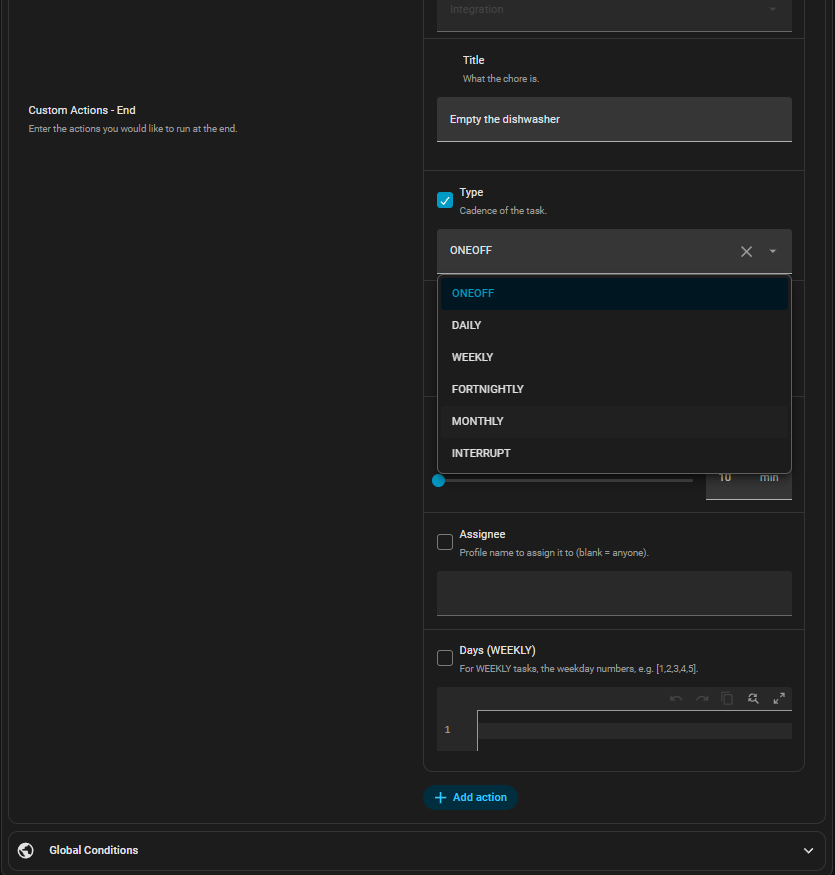
Reference values from a live setup:
| Appliance finishes | Chore | onerousness × minutes |
|---|---|---|
| Dishwasher | Empty the dishwasher | 2 × 10 |
| Washing machine | Hang out the washing | 3 × 10 |
| Dryer | Fold and put away the dry clothes | 3 × 15 |
Good to know:
- Each cycle creates a new chore: two dishwasher runs = two chores. (Advanced: a condition on the integration's open‑tasks sensor can skip duplicates.)
- The pattern works with any trigger, not just appliances — bin night, a lawn‑length sensor, low printer paper: anything HA can detect →
adhdtasker.add_task. - The blueprint also does notifications, a watchdog, cycle counters and energy‑cost tracking (v4.0+) — all optional and independent of the chore action.
Cycle‑end detection is by Blackshome's "Appliance Notifications & Actions" blueprint — an outstanding community blueprint; ADHDTasker just adds the chore. Support and discussion in the Home Assistant community thread — consider supporting Blackshome.
Commands in (HA → ADHDTasker)
A single REST endpoint, authed with a per‑family API key (generate it in Manage → Inbound API) sent as an X-API-Key header.
Endpoint: https://us-central1-adhdtasker-68a50.cloudfunctions.net/api
| Method / action | Does |
|---|---|
GET | Board state: open count, counts, leaderboard, tasks |
POST add_task | Create a task (points = onerousness × minutes × rate) |
POST add_interrupt | Capture a zero‑point note |
POST claim_task | Mark in‑progress (by id or title) |
POST complete_task | Mark done and award points |
POST approve_task | Approve a submitted task (→ done + award) or a proposal |
POST update_task | Edit/rename a task (recomputes points) |
POST delete_task | Remove a task |
POST ping | Send the ping push |
Try it:
# read the board
curl -H "X-API-Key: YOUR_KEY" https://us-central1-adhdtasker-68a50.cloudfunctions.net/api

# add a chore
curl -X POST -H "X-API-Key: YOUR_KEY" -H "Content-Type: application/json" \
  -d '{"action":"add_task","title":"Unpack the groceries","onerousness":3,"minutes":10}' \
  https://us-central1-adhdtasker-68a50.cloudfunctions.net/api
Add this to configuration.yaml (a REST command + a sensor for dashboards):
rest_command:
  adhdtasker:
    url: "https://us-central1-adhdtasker-68a50.cloudfunctions.net/api"
    method: POST
    headers:
      X-API-Key: !secret adhdtasker_api_key
      Content-Type: application/json
    payload: "{{ payload }}"

sensor:
  - platform: rest
    name: ADHDTasker
    resource: "https://us-central1-adhdtasker-68a50.cloudfunctions.net/api"
    headers:
      X-API-Key: !secret adhdtasker_api_key
    value_template: "{{ value_json.open }}"
    json_attributes: [counts, leaderboard]
scan_interval: 300Example automations
Drop‑in examples — swap the placeholder entity_ids for your own.
1 · Ping the family on school mornings (inbound)
- alias: ADHDTasker School Morning Ping
  triggers:
    - trigger: time
      at: "07:00:00"
  conditions:
    - condition: time
      weekday: [mon, tue, wed, thu, fri]
  actions:
    - action: rest_command.adhdtasker
      data:
        payload: '{"action":"ping","title":"School morning","message":"Time to get ready for school!"}'
  mode: single
2 · Bedtime board briefing (inbound, uses the sensor)
- alias: ADHDTasker Bedtime Briefing
  triggers:
    - trigger: time
      at: "19:30:00"
  conditions:
    - condition: numeric_state
      entity_id: sensor.adhdtasker
      above: 0
  actions:
    - action: tts.speak
      target:
        entity_id: tts.home_assistant_cloud      # your TTS engine
      data:
        media_player_entity_id: media_player.living_room   # your speaker
        message: >
          {{ states('sensor.adhdtasker') }} chores still need doing.
          {% set lb = state_attr('sensor.adhdtasker','leaderboard') %}
          {% if lb and lb[0].lifetime | int > 0 %} {{ lb[0].name }} is leading with {{ lb[0].lifetime }} points.{% endif %}
  mode: single
3 · Announce + colour‑pulse a light (outbound, DIY)
The blueprint above does this per‑profile — but if you'd rather hand‑roll it, trigger on the integration's adhdtasker_event. Amber on due, green on completed, purple on reward — flashes 3 seconds, then restores the light.
- alias: ADHDTasker Announcements
  triggers:
    - trigger: event
      event_type: adhdtasker_event
  variables:
    event: "{{ trigger.event.data.event }}"
    title: "{{ trigger.event.data.get('task', {}).get('title', 'a task') }}"
    who: "{{ trigger.event.data.get('profile', {}).get('name', 'Someone') }}"
    colour: "{{ {'task.due': [255,152,0], 'task.completed': [67,160,71], 'reward.requested': [156,39,176]}.get(trigger.event.data.event) }}"
  actions:
    - choose:
        - conditions: "{{ event == 'task.completed' }}"
          sequence:
            - action: tts.speak
              target: { entity_id: tts.home_assistant_cloud }
              data:
                media_player_entity_id: media_player.living_room
                message: "Nice work {{ who }}! You finished {{ title }}."
    # must render a real boolean — "{{ colour }}" renders the list itself → treated as False
    - if: "{{ colour is not none and colour | count == 3 }}"
      then:
        - action: scene.create
          data: { scene_id: adhdtasker_restore, snapshot_entities: [light.living_room] }
        - action: light.turn_on
          target: { entity_id: light.living_room }
          data: { rgb_color: "{{ colour }}", brightness_pct: 100 }
        - delay: "00:00:03"
        - action: scene.turn_on
          target: { entity_id: scene.adhdtasker_restore }
  mode: queued
  max: 25
⬇ Download all examples Read the step‑by‑step guide →
Security
- The API key is full family automation access — it can add, edit, delete, complete and approve tasks (completing/approving awards points). Treat it like an admin password. To revoke it, regenerate in the web app → Manage → Inbound API: the old key stops working immediately, then update Home Assistant with the new one.
- The webhook URL is a secret too — anyone holding it can post events at your HA; pair it with the shared secret.
- The outbound webhook carries a shared secret so automations can ignore spoofed POSTs.
- A Nabu Casa cloudhook keeps your HA instance off the public internet.
Home Assistant is a trademark of the Open Home Foundation. ADHDTasker is an independent integration and is not affiliated with or endorsed by Home Assistant.